


Speaker Cleaner - Water Eject
4.13.00 Reviews
App Specs
- Version
- 1.6.0
- Updated On
- License
- Free
- Downloads
- 500,000+
- Developer
- Ego Global Ltd
- Categories
- Productivity
- Platform
- Android
Screenshots
 Analysis by AppCompare
A wet phone speaker can turn an ordinary mishap into an irritating guessing game: is the sound muffled because water is sitting near the grille, or has something else gone wrong? Speaker Cleaner - Water Eject is designed for the first situation, using sound playback as a practical first step rather than a repair service. I’d treat it as a small tool to try after a splash, not as a reason to keep using a phone that may have serious water damage.
That distinction matters from the start. A speaker-cleaning app can offer a way to address moisture around the speaker, but it cannot make every wet device safe or fix damage inside it. My advice is to handle the phone carefully, avoid charging it while wet, and use the app only when the device is otherwise safe to operate. If the phone was submerged or behaves unusually, professional support is a better next step than repeatedly playing tones and hoping for a cure.
A practical first response to muffled sound
The app is a free productivity utility from Ego Global Ltd. It has an average rating of 4.1 from around 300 ratings and has been installed over 500,000 times. Its Everyone age rating makes it suitable for a general audience. Those figures suggest it has found an audience, but they don’t guarantee that it will solve a particular speaker problem; the cause and severity of the problem still matter.
In everyday use, the appeal is straightforward: when a small splash leaves audio sounding dull, you can try a focused sound-based routine before deciding whether the issue needs more attention. That makes it more convenient than searching for a tone online or adjusting settings by trial and error. Still, convenience shouldn’t be confused with certainty. I’d listen for a clear change and stop if the phone becomes hot, behaves erratically, or the sound worsens.
Getting Started with Speaker Cleaner - Water Eject
First off, downloading Speaker Cleaner - Water Eject was a breeze. Available on both Android and iOS, it’s lightweight, so it won’t hog your phone’s precious storage. Once you’ve installed it, the app greets you with a simple, user-friendly interface. No clutter, just straightforward options. You know an app means business when it’s not trying to be flashy.
The current version is 1.6.0, and it runs on Android 7.0 or later. That makes it an option for a range of Android devices, although compatibility alone doesn’t tell you how well a tone will work with a particular phone’s speaker design. The app’s release date is March 6, 2026, so it is a relatively recent addition to this kind of utility. I’d still make the decision based on the immediate job: a small, localized speaker issue is a more sensible test case than a phone that has been drenched.
How Does It Work?
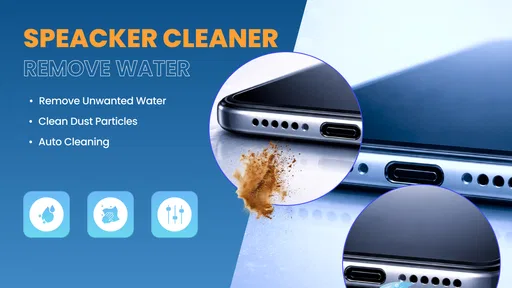
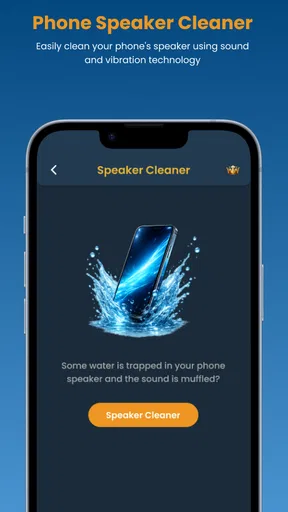
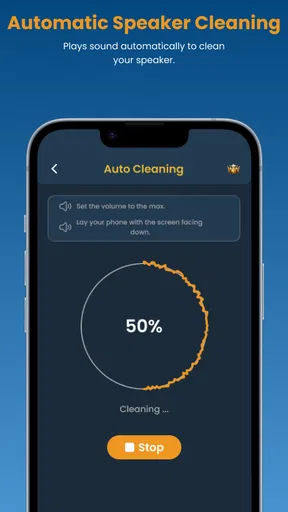
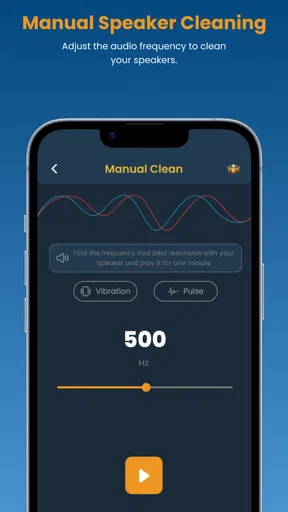
So, here’s the science (or magic, depending on how you see it) behind it. The app uses sound waves to eject water from your speaker grills. Yeah, seriously! By playing specific sound frequencies, it pushes water out of those tiny openings. The app offers multiple modes, each with different frequencies, so you can find what works best for your soggy situation.
Worth Reading Before You Choose

EA SPORTS FC Mobile 26 Is a Bigger Football Game, but It Takes Time

Flipboard Shows What News Apps Must Do Beyond the Feed

Switching to Android Auto Means Rethinking Your Driving Routine

Google Calendar Makes a Crowded Week Easier to Manage

Ludo King Makes the Most of the Minutes Between Plans

Baby Panda World Brings Quick Play to Modern Phones, but Its Game Library Feels Busy
Here’s a quick rundown:
- Standard Mode: A general setting that works for most water-related mishaps.
- Deep Clean: For when your phone takes a full-on dive into the pool.
- Custom Mode: Allows you to adjust frequencies manually if you’re feeling adventurous.
For a useful routine, I’d start with the general option rather than experimenting with manual adjustments while the phone is wet. Keep the speaker area unobstructed and set the phone on a stable surface, where you can see whether anything is actually expelled. Don’t block the grille with a finger or press fabric against it: that can make it harder to notice a change and may trap moisture. If you do not hear improvement after a reasonable attempt, take that as a cue to reassess rather than simply increasing the intensity or repeating the process indefinitely.
Putting It to the Test
I decided to test it out after a minor splash incident. With a quick tap, the app began playing a series of pulsating sounds. It was oddly satisfying watching droplets of water slowly emerge from the speaker holes. After a few minutes, my speakers were back to their original crispness. Color me impressed!
A realistic use case is getting caught in a brief shower while walking home, then noticing that a voice message sounds muted once you are indoors. I’d dry the outside of the phone first, keep it away from charging cables, and use the cleaner as a measured attempt to improve the speaker output. Afterward, I’d replay the same short voice message or a familiar audio clip at a moderate volume. Comparing the same source is more useful than switching between unrelated songs, since different recordings can sound very different even when the speaker itself has not changed.
There is also a practical handoff between the app and the rest of the phone. If the result seems better, check the speaker with a call, notification, or spoken audio rather than relying only on the app’s own sound. If the audio remains distorted across several sources, the next step is not necessarily another cleaning cycle: check that the volume is set sensibly and that nothing is covering the grille, then consider device support. The app can help with one possible cause, but it cannot diagnose a damaged speaker or a problem elsewhere in the phone.
One trade-off is that the sound itself may be uncomfortable in a quiet room or irritating to people nearby. I’d avoid holding the phone close to my ear while a cleaning tone plays, and I would not run it beside someone who is trying to sleep or work. A short, deliberate test is easier to judge than leaving a loud tone running while doing something else. If you are in a shared space, wait until you can use it without disturbing others.
One thing to keep in mind, though, is that results can vary. If your phone’s been completely submerged or if the water’s been there for a while, it might take a couple of tries to get rid of all the moisture. But hey, patience is a virtue, right?
Additional Features
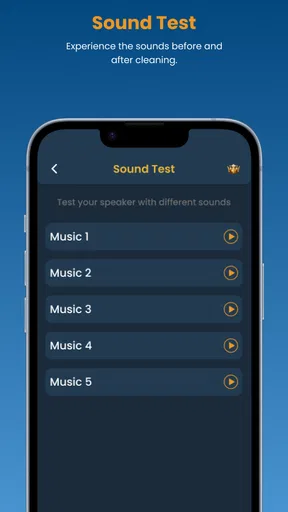
Beyond water ejection, the app also offers some nifty extra features. There’s a built-in test to check your speaker’s sound quality post-cleaning. It plays a few audio clips and lets you compare the clarity before and after the water removal process. Kind of like giving your phone a little health check-up.
A before-and-after check is most useful when you listen for specific things: whether speech is easier to understand, whether the sound still crackles, and whether both sides of stereo audio seem balanced if your device has more than one speaker. I’d keep the comparison brief and use audio I know well, rather than treating a listening test as a technical measurement. A test can help me decide whether there is an obvious improvement, but it cannot confirm that the inside of the phone is dry or that every component is undamaged.
Another cool feature is the app’s ability to remove dust particles. By using similar sound frequencies, it claims to dislodge any pesky debris stuck within your speaker grills. It’s a neat trick if you’ve been using your phone in dusty environments.
That dust option is best viewed as a light maintenance attempt, not a substitute for careful cleaning. I would not poke the grille with a pin, use a liquid cleaner, or force compressed air into it just because the sound remains dull. Those approaches can create a new problem while trying to solve the old one. If visible debris is lodged in the opening or the speaker is still poor after a gentle attempt, a repair professional is a safer choice.
Where this tool fits—and where it doesn’t
Compared with the usual alternatives, this app sits between doing nothing and seeking service. Searching for a free tone elsewhere may seem just as quick, but a dedicated cleaner gives the process a clearer purpose and keeps the task in one place. A soft exterior wipe can remove water from the phone’s surface, but it cannot by itself address moisture near the speaker opening. On the other hand, neither a tone nor a wipe is a replacement for a technician when the device has been submerged, shows warning signs, or continues to sound distorted.
I’d recommend it most to someone who occasionally gets caught in rain, splashes a little water near the phone, or wants a simple first attempt before deciding whether a minor audio issue persists. It is less appropriate for someone who needs a guaranteed fix, has a phone with serious water exposure, or is troubleshooting a speaker that was already crackling before it got wet. It is also not the right choice if the phone is unstable or too wet to operate safely; in that situation, stop using it and seek device-specific guidance.
For someone deciding whether to install it, the main question is whether they want a convenient, focused tool for an occasional speaker problem. It is free, and its simple purpose makes it easy to understand without treating it as a full diagnostic suite. The limitation is equally clear: the app’s method can only help when the problem is one that sound playback can address. I would not keep it installed expecting it to prevent water damage or protect the phone from future accidents.
Is It Worth It?
Honestly, for an app that’s free (with optional in-app purchases), Speaker Cleaner - Water Eject is a solid addition to your utility arsenal. It’s one of those apps you hope you’ll never need, but when you do, you’re grateful it’s there. Sure, it’s not a miracle worker, and there are situations where it might not fully resolve the issue, but for minor water exposure, it’s a game-changer.
My overall view is that it is worth trying for a modest, well-defined problem: a phone that still works normally but has temporarily muffled audio after a small splash. I would use it once as part of a careful check, compare the result with familiar audio, and decide what to do next. If the speaker returns to normal, there is little reason to keep repeating the process. If it does not, the useful outcome may be knowing that a simple sound-based attempt was not enough.
In conclusion, if you’re prone to water-related accidents or just want some peace of mind, give this app a shot. It’s easy to use, doesn’t require any special equipment, and best of all, it could save you from a costly repair bill. So next time you’re caught in the rain or suffer a clumsy coffee spill, remember, your phone’s knight in shining armor is just a tap away.
Pros
- Effective water ejection feature.
- User-friendly interface.
- Quick cleaning process.
- No special permissions required.
- Works offline.
Cons
- Limited to speaker cleaning only.
- Ads can be intrusive.
- No additional cleaning features.
- Occasional app crashes.
- Requires manual activation.
FAQs for Speaker Cleaner - Water Eject
What is Speaker Cleaner - Water Eject and how does it work?
Speaker Cleaner - Water Eject is a utility app designed to help remove water and dust from your smartphone speakers. By emitting specific sound frequencies, the app vibrates the speaker membrane, helping to dislodge trapped particles. This process can improve audio clarity and restore speaker performance after exposure to moisture.
Is Speaker Cleaner - Water Eject safe to use on all devices?
Yes, Speaker Cleaner - Water Eject is generally safe for most smartphones. However, it is important to ensure your device is compatible with the app. Check the app’s description for any specific device requirements or limitations. Always follow the provided instructions carefully to avoid potential damage to the speaker.
How often should I use Speaker Cleaner - Water Eject?
The frequency of use depends on your usage habits and environmental conditions. If your phone is often exposed to moisture or dust, using the app occasionally can help maintain optimal speaker performance. However, overuse is unnecessary and it’s best to use the app only when you notice a decline in audio quality.
Does Speaker Cleaner - Water Eject require an internet connection?
No, Speaker Cleaner - Water Eject does not require an internet connection to function. It operates offline, making it convenient to use anytime, anywhere. This can be particularly useful if you need to clear your speakers after exposure to water when you’re not connected to the internet.
Are there any precautions I should take before using the app?
Yes, ensure your device is at a safe distance from your ears when using the app due to the loud sounds it emits. Additionally, remove any case or cover that might obstruct the speakers. If your device has been submerged in water, dry it thoroughly before using the app to prevent further damage.


